HuntFish OH
- 4.2
- Rating
- 100.00K
- Installs
- Free
- Price
 Analysis by App-foxy
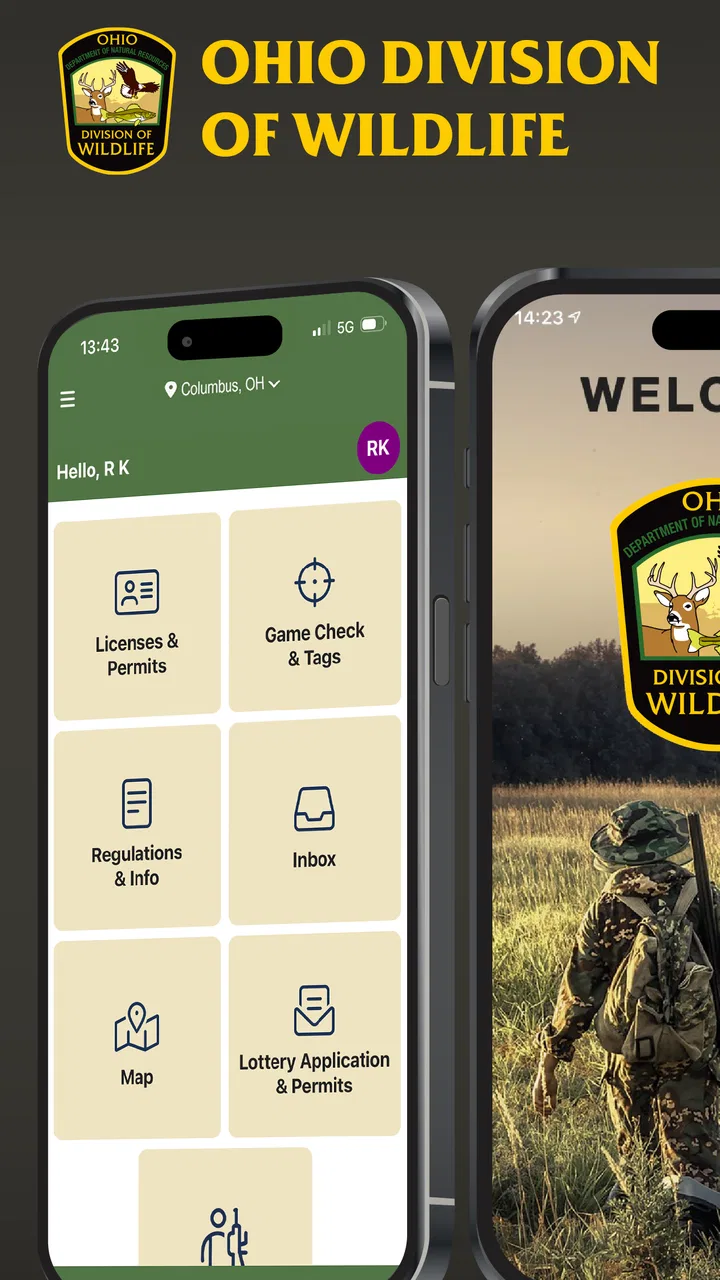
HuntFish OH is the kind of sports app I would install before heading out for a day of hunting or fishing in Ohio, not because it tries to replace every outdoor tool, but because it brings two important tasks into one official mobile experience: licensing and game checks. I found its value easiest to understand when thinking about the moments around a trip, rather than expecting it to behave like a navigation app, a weather service, or a detailed field guide.
The app is the official licensing and game check app of the Ohio Division of Wildlife. That gives it a clear purpose and makes it more relevant to Ohio residents and visitors who need to handle state-related hunting and fishing tasks from a phone. It is free, aimed at Everyone, and belongs in the sports category, although its practical role is closer to a digital outdoor administration tool than a conventional sports tracker.
My overall impression is positive but practical. HuntFish OH is most useful when I treat it as part of my preparation routine: install it before leaving, sign in or complete the necessary setup while I have time, and check that the app is ready before I am standing outdoors with poor reception or cold hands. That simple change in timing avoids much of the frustration people can experience with any official service app.
You May Also Like

 Blood Strike: 2.5 Anniversary
Blood Strike’s Loadouts Turn Every Drop Into a Tactical Gamble
A close look at Blood Strike’s custom loadouts: how fast access to signature weapons reshapes its battle royale rhythm, rewards preparation, and narrows the gap between fights.

 Pandora - Music & Podcasts
Pandora’s Music Is Easy to Start, but Harder to Recover
Pandora’s strength is its low-effort path from a seed to a station. Its weak spot is how much confidence it asks you to place in connection, setup, and quiet recovery.

 8 Ball Pool
 Is Built on Rivalries, Rematches, and Routine
A close look at the rivalries, rematches, shared routines, and unanswered safety questions that turn a quick pool match into a persistent mobile community.

 Samsung Music
’s Quiet Strength Is Playing What You Already Own
Its reach comes less from spectacle than from dependable access to a personal library. That simplicity is both the app’s strongest retention engine and its ceiling.

 AccuWeather: Weather Radar
AccuWeather Review: A Quick, Clear Forecast for Everyday Decisions
For everyday plans, the best forecast is the one you can understand quickly. AccuWeather makes rain timing, radar, and local conditions easy to act on, with a few trade-offs.

 Hill Climb Racing
Why Hill Climb Racing Still Turns Crashes Into One More Run
A tiny car, a bumpy hill and one more upgrade: Hill Climb Racing keeps resurfacing because its simple chaos makes every near-miss feel personal.
More From Our News Desk
View All News


Getting past the first setup hurdles
I find the first setup is less stressful when I treat it as part of trip planning rather than something to tackle at the trailhead. This section looks at the small checks that help me distinguish an account or connection snag from a problem with the phone, so I can start an outing with a clearer sense of what is ready.
Why the first launch deserves attention
The most likely sticking point is not the basic idea of the app, but the transition from downloading it to actually being ready to use. Official licensing applications often require personal details, account access, or confirmation steps, and those steps are easier to handle at home than beside a lake or in a vehicle before dawn. I recommend opening HuntFish OH well before the trip and moving through the initial screens without rushing.
I would also keep the information I use consistent with the details associated with my Ohio wildlife account or licensing records. A small mismatch in a name, address, or account detail can feel like an app failure when the real issue is simply that the service cannot match the information. The safest approach is to review each entry carefully instead of repeatedly submitting a form and hoping one attempt goes through.
Because the app is free, there is no purchase decision blocking the first try. That is helpful for occasional visitors who do not want to pay for a separate utility just to manage an outdoor trip. It also means I can install it before deciding whether it fits my routine, rather than committing money before seeing how comfortable the workflow feels.
Checks I would make before leaving home
My preparation checklist would be short but deliberate. I would update the application if an update is available, open it once after installation, and make sure I can reach the licensing or game-check area I expect to use. I would then keep the phone charged and avoid assuming that an outdoor location will provide strong mobile service. These are ordinary steps, but they matter more here because a delay at the point of harvest or inspection is much more stressful than a delay in the living room.
HuntFish OH is listed as version 1.3.9 and supports devices running Android 5.1 or later. That broad minimum requirement makes it accessible to people using older Android phones, although compatibility on paper does not guarantee an equally smooth experience on every older device. If a phone has very little free storage, an aging operating system, or aggressive battery-saving settings, I would address those issues before relying on it outdoors.
I would not use the installation itself as proof that everything is ready. The useful test is to open the app, move through the relevant account or license screens, and confirm that the phone remains responsive. If the app asks me to verify something, I would complete that process while connected to a dependable network. Waiting until the field creates unnecessary pressure.
What to do when a screen seems stuck
When an official app appears frozen, I first separate a loading problem from an account problem. A page that never finishes loading may be caused by a weak connection, while a message about credentials or personal information needs a different response. I would close and reopen the app once, check the connection, and try again without rapidly tapping the same button.
If the issue continues, I would restart the phone and confirm that automatic date and time settings are active. Incorrect device time can interfere with secure sign-in or online forms in some applications, so it is a sensible general check without changing anything inside the account. I would also make sure the app is not being restricted in the background by a battery-saver mode during an active session.
Clearing an app’s storage is a more serious step because it can remove locally saved session information. I would not do that as my first reaction. If I eventually need to reset the app, I would make sure I know the account details and any information needed to sign in again. That distinction is important: a quick reinstall may feel convenient, but it can turn a temporary connection problem into a longer account-recovery task.
Building a dependable hunting and fishing workflow
A dependable routine means knowing which tasks belong in the app and which still need another tool or a backup plan. Here I focus on how I would prepare for licensing and game checks, then handle an interrupted session without creating uncertainty about whether an action went through.
Prepare the administrative part before the outdoor part
The strongest way to use HuntFish OH is to separate preparation from field action. At home, I would handle licensing tasks, review the screens I expect to need, and make sure the application opens correctly. In the field, I would use it for the specific official action required at that moment instead of trying to learn the interface under pressure.
This workflow is especially useful for someone who goes out early, travels to a new area, or visits Ohio only occasionally. A regular local user may already know the process, but a visitor has more opportunities to confuse a license task with a game-check task. Spending a few minutes exploring the app in advance helps establish where each function lives and reduces the temptation to make assumptions.
I would keep the phone accessible but protected from the conditions around hunting and fishing. A wet screen, gloves, glare, and low temperatures can make any touch interface harder to operate. That is not a flaw unique to HuntFish OH, but it changes how I judge the app: a clean indoor workflow is not enough if I have never tested whether I can use it comfortably outdoors.
Recovering from an interrupted session
Suppose I start a game-check process and the connection drops. My first move would be to avoid submitting the same information repeatedly. I would check whether the app shows a confirmation, receipt, or completed status before beginning again. Duplicate attempts can create confusion, especially when I am unsure whether the first request reached the service.
If the app closes unexpectedly, I would reopen it and look for the last confirmed state rather than relying on memory. I would note the time and the action I was trying to complete, then retry only when the connection is stable. Keeping a simple written record of what happened is useful if I later need help, because “it did not work” is much less informative than explaining which screen opened, what was entered, and whether a confirmation appeared.
For a trip where the official check is essential, I would not wait until the final minute. The better recovery plan is to complete the digital step as soon as it is appropriate, verify the result, and then continue with the outing. HuntFish OH can simplify the process, but it cannot remove the need for judgment when a phone loses service or a submission result is unclear.
Using the app without expecting it to do everything
One of the most useful trade-offs is knowing what belongs in this app and what belongs elsewhere. I would use it for Ohio licensing and game-check responsibilities. I would use a weather app for changing conditions, a map for route planning, and a separate notes system if I wanted a detailed record of locations, equipment, or observations. Trying to force one official utility to cover all those jobs would make the experience feel limited when the real issue is mismatched expectations.
This is also why I would not compare it directly with a general hunting planner or a fishing log. Those alternatives may offer richer organization for personal records, while HuntFish OH has the more important advantage of being tied to the Ohio Division of Wildlife’s official process. For compliance-related actions, an official channel is more reassuring than an attractive third-party interface that is not designed around the state’s own workflow.
When the app may not be the real problem
It is easy to blame the application when a license screen fails to load, but several outside factors can produce the same symptom. Weak cellular coverage, an overloaded public network, a phone that has not been restarted for a long time, or an outdated app can all interfere with a session. I would test the connection by opening another trusted page, switch between Wi-Fi and mobile data when appropriate, and retry once rather than repeatedly pressing the same control.
Account details are another common source of confusion. If the app rejects information, I would recheck spelling, spacing, and the account I am using before deciding that the service is broken. I would also avoid creating multiple accounts simply because the first sign-in attempt was inconvenient. Multiple profiles can make it harder to know which record is current.
Device settings can matter too. A nearly full phone, a disabled network connection, restrictive data settings, or a battery mode that pauses applications may interrupt an otherwise normal session. These checks are not a substitute for official support, but they are sensible first steps and can quickly show whether the problem follows the app or the phone.
Who will appreciate it most
I think HuntFish OH is a strong fit for Ohio hunters and anglers who want one official place to manage state licensing and game-check needs. It is also practical for occasional users who prefer not to carry extra paperwork or search through several unrelated services. The free price lowers the barrier, and the Everyone rating makes it suitable for a broad household audience, although adults should still supervise younger users when personal or licensing information is involved.
The app is less compelling for someone who only wants maps, weather forecasts, catch journals, or a social community. It is not the tool I would choose as the center of a complete outdoor planning system. I would also hesitate to rely on it as the only preparation step for a remote trip if I had never opened it before, because no mobile service can guarantee a smooth transaction in every location.
How the adoption numbers affect my view
HuntFish OH has passed one hundred thousand installs, with an average rating of 4.2 from roughly three hundred sixty-five ratings and about one hundred sixty written reviews. I read that as a sign of useful real-world adoption rather than universal perfection. The rating is encouraging, but it also fits my own conclusion: the app can be valuable when its focused purpose matches the user’s needs, while individual setup or connectivity problems can still shape the experience.
The developer is listed as Sovereign Sportsman is now PayIt LLC. That detail is worth noticing when looking for help or trying to understand why an account, payment, or licensing screen may use a name different from the app title. I would use the support route presented inside the official service or the relevant Ohio wildlife channel, and I would describe the exact step that failed instead of sending a vague complaint.
My practical verdict
After looking at the app as a real trip companion rather than a general outdoor platform, I see a clear reason to keep it installed if I hunt or fish in Ohio. HuntFish OH is most valuable when it is prepared before the trip, not discovered during the urgent part of the trip. Opening it early, checking the account flow, confirming a successful action, and keeping a backup plan for poor connectivity make a noticeable difference.
I would recommend it to anyone who needs Ohio licensing or game-check access and wants the convenience of a free official app. I would not recommend treating it as a replacement for maps, weather tools, or careful trip preparation. Its focused design is both its strength and its limitation: it avoids becoming a cluttered outdoor toolbox, but it also leaves other planning jobs to other apps.
For me, the final decision is straightforward. If Ohio hunting or fishing is part of my routine, I would install HuntFish OH, complete the initial setup at home, and test the exact workflow before heading out. If I rarely need those state services or want a feature-rich field journal, another category of app may suit me better. Used for its intended purpose and with realistic preparation, though, it is a sensible and useful addition to an Ohio outdoor kit.
FAQs for HuntFish OH
01What is HuntFish OH and what can I do with it?
HuntFish OH is a comprehensive app designed for outdoor enthusiasts in Ohio. It allows users to buy licenses, check hunting and fishing regulations, and get real-time updates on weather and wildlife activity. The app also offers maps and GPS features to navigate hunting areas efficiently.
02Is HuntFish OH available for both Android and iOS devices?
Yes, HuntFish OH is available for download on both Android and iOS platforms. You can find it on the Google Play Store for Android devices and the Apple App Store for iOS devices. This ensures a wide range of users can access its features regardless of their device preference.
03Does the app provide real-time updates on weather conditions?
Absolutely. HuntFish OH includes real-time weather updates to help users plan their outdoor activities effectively. This feature is crucial for hunters and anglers who need to monitor weather conditions closely to ensure safety and maximize their experience in the field.
04Can I purchase hunting and fishing licenses directly through the app?
Yes, HuntFish OH allows users to purchase and store their hunting and fishing licenses directly within the app. This convenient feature eliminates the need for physical copies, making it easier for users to access their licenses anytime, anywhere, even when offline.
05Is there a community feature to connect with other hunters and anglers?
HuntFish OH does not currently have a specific community feature. However, it focuses on providing essential tools and information to enhance your hunting and fishing experience. Users can still share their experiences and tips through external platforms or social media.
Pros
- Comprehensive wildlife regulations guide.
- Interactive maps for hunting/fishing spots.
- Real-time weather updates included.
- Offline access to essential info.
- Easy-to-use interface for quick navigation.
Cons
- Limited to Ohio-specific regulations.
- Occasional GPS accuracy issues.
- Requires frequent app updates.
- No social media sharing features.
- Subscription needed for premium content.

HuntFish OH
Gallery